RSS is "the next big thing" -- you can use it to get newsfeeds from CNN or BBC, as well as just about anything else, including news on upcoming movies, DVD releases, your favorite band's tour updates, etc.
Once you get started, it's like having your favorite parts of the Web come to you. No need to go out and check for updates all the time.
No more bookmarks!
"RSS" means "Really Simple Syndication." But that is just a fancy way of saying that you can keep up with all the updates to CriticalBench.com without having to check the site every week to see "what's new." Whenever we put up a new page or update an old one, I release it through RSS. And...
I can share them with you from time to time through RSS. This gives you my most recent updates and articles without you having to spend hours on the site.
Yes, RSS is amazing. If you can't tell, I'm completely addicted to it. No e-mail. No spam. It's so easy to subscribe and unsubscribe. If you get tired of me , you just have to delete the feed. It's awesome!
And once you start, you'll soon be tracking all your other favorite interests and news in the world.
How do you get started? Easy.
Download free RSS Reader first (skip to bottom if you do not want to download software). This is special software that reads the "RSS feeds" from the largest news organizations or any other site you're interested in.
Right-click (control-click for Mac users) on any orange RSS button on a site, blog or news source that interests you. Start by right-clicking on the orange button below. Then...
Select Copy Shortcut ("Copy Link to Clipboard" for Mac), and paste that URL into your RSS Reader.


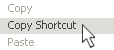 Select Copy Shortcut ("Copy Link to Clipboard" for Mac), and paste that URL into your RSS Reader.
 Right-click and get started.
  Add CriticalBench.com RSS to your "My Yahoo!"
 Add CriticalBench.com RSS to your Google Personalized Home Page